For commercial cleaning companies
Know every site was cleaned, and fix what was missed.
Schedule recurring visits, record attendance, capture cleaning checks with photos and track the follow-up work, all in one place. Then send your client the proof.
From $45 a month for your whole crew. No per-cleaner fees.
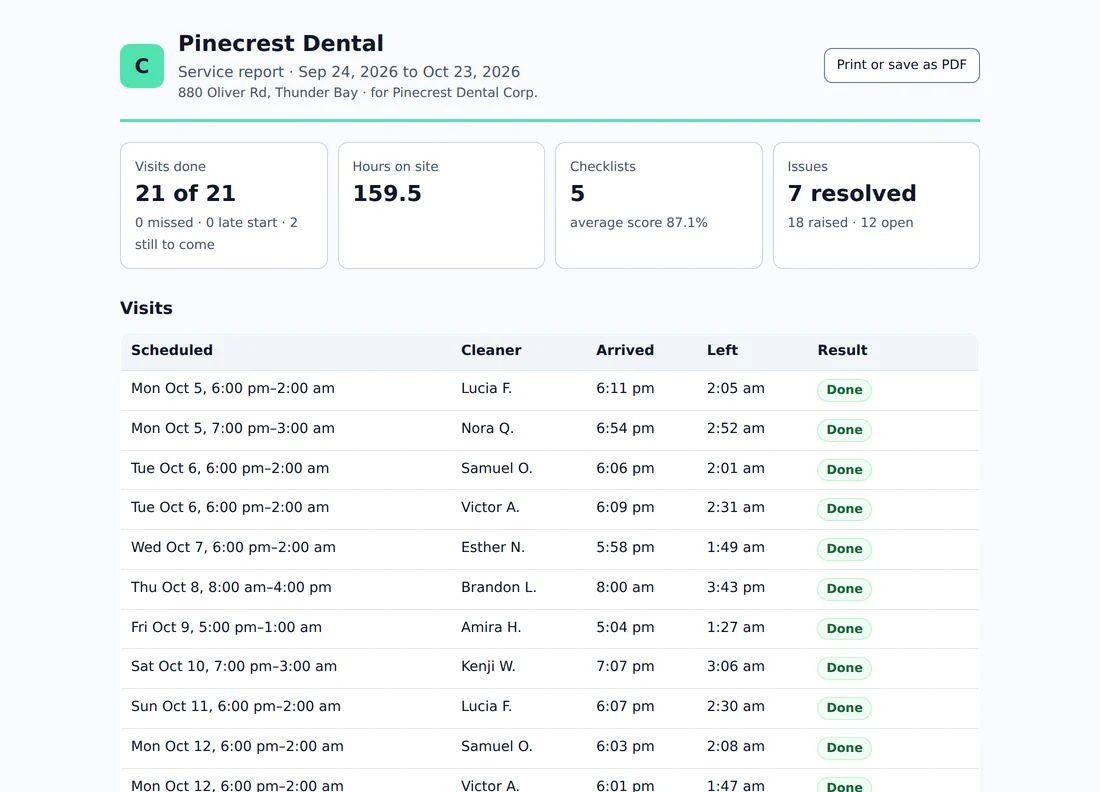
The report your client gets, built from the night's records. Sample data.
One missed item, start to finish
From the night's visit to the client's report.
Out of towels on the third floor. Here is what happens to that, without anyone chasing a group chat.
The visit is on the schedule
Every building, every night, repeating on the days in the contract. Change one night or the rest of the series.
The cleaner clocks in on site
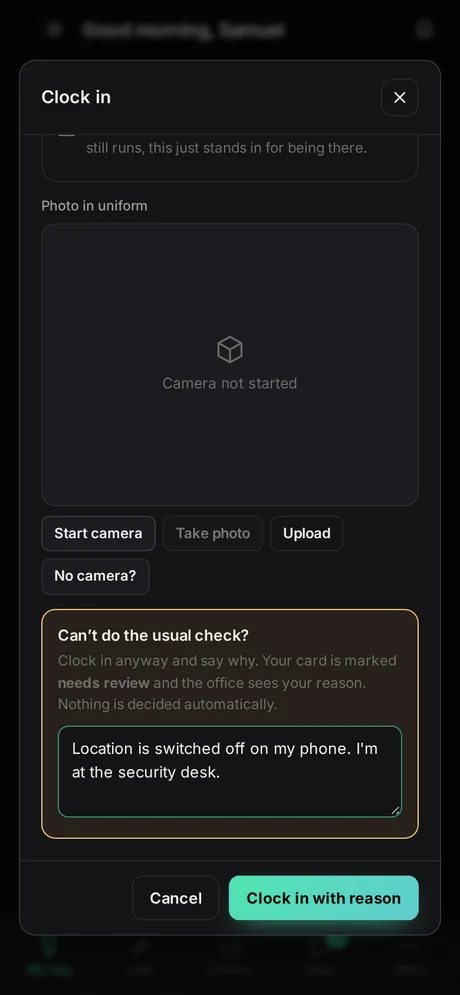
Checked against the building's location, with a photo. If the phone can't share where it is, they say why and you review it.
The checklist opens by itself
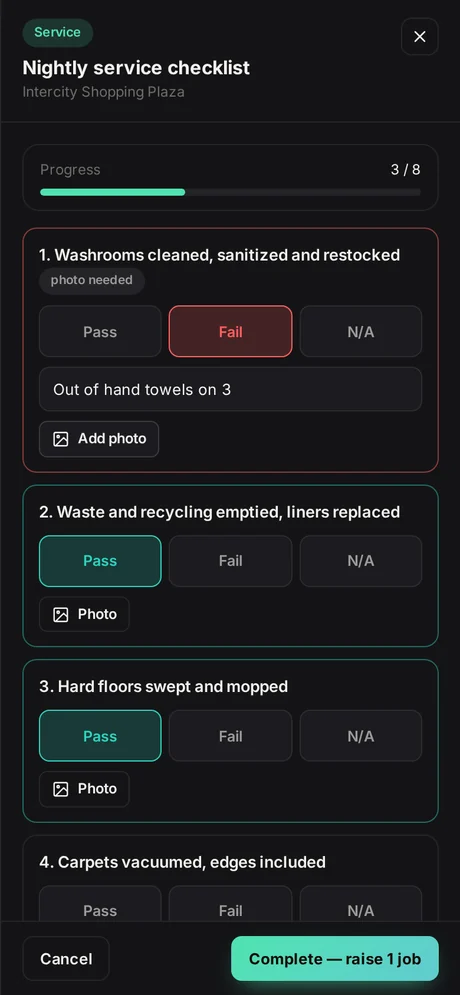
The building's own list, line by line, with photos on the lines that need proof. Answers stay on the phone if the signal drops.
A missed item becomes a job
A failed line raises one job to fix it, with the photo and the note, linked back to the check that found it.
The client sees it was done
A service report for the building: visits, checklists with photos, and what was raised and fixed. Print it or send a link.
The supervisor's first screen
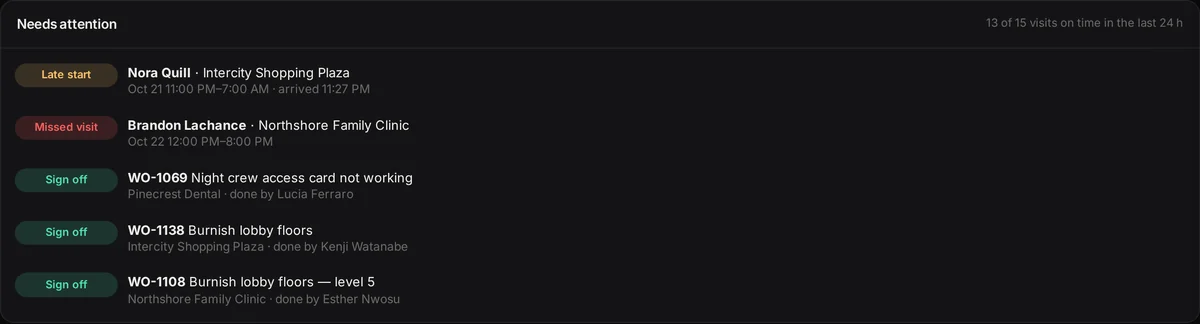
What needs you, right now.
A late start, a visit nobody showed up for, a clock-in without a location, a fix that's overdue. Each one arrives once, and the list is empty when everything is covered.
What changes
Less chasing. Clearer sites. Easier reporting.
Fewer follow-up messages
Late and missed visits come to you once, in plain words. You don't text the crew to find out who's where.
Every building's status in one place
Which visits happened, which checklists failed, and which fixes are still open, with the photos.
Client reports without the copy-paste
The weekly or monthly report builds itself from the night's records. Print it, or send a link.
On the cleaner's phone
Built for one hand in a hallway.
Clock in, and the building's checklist opens. Big buttons, photos where they matter, and a reason box instead of a dead end when the phone won't cooperate.
What your client gets
A service report you'd be glad to send.
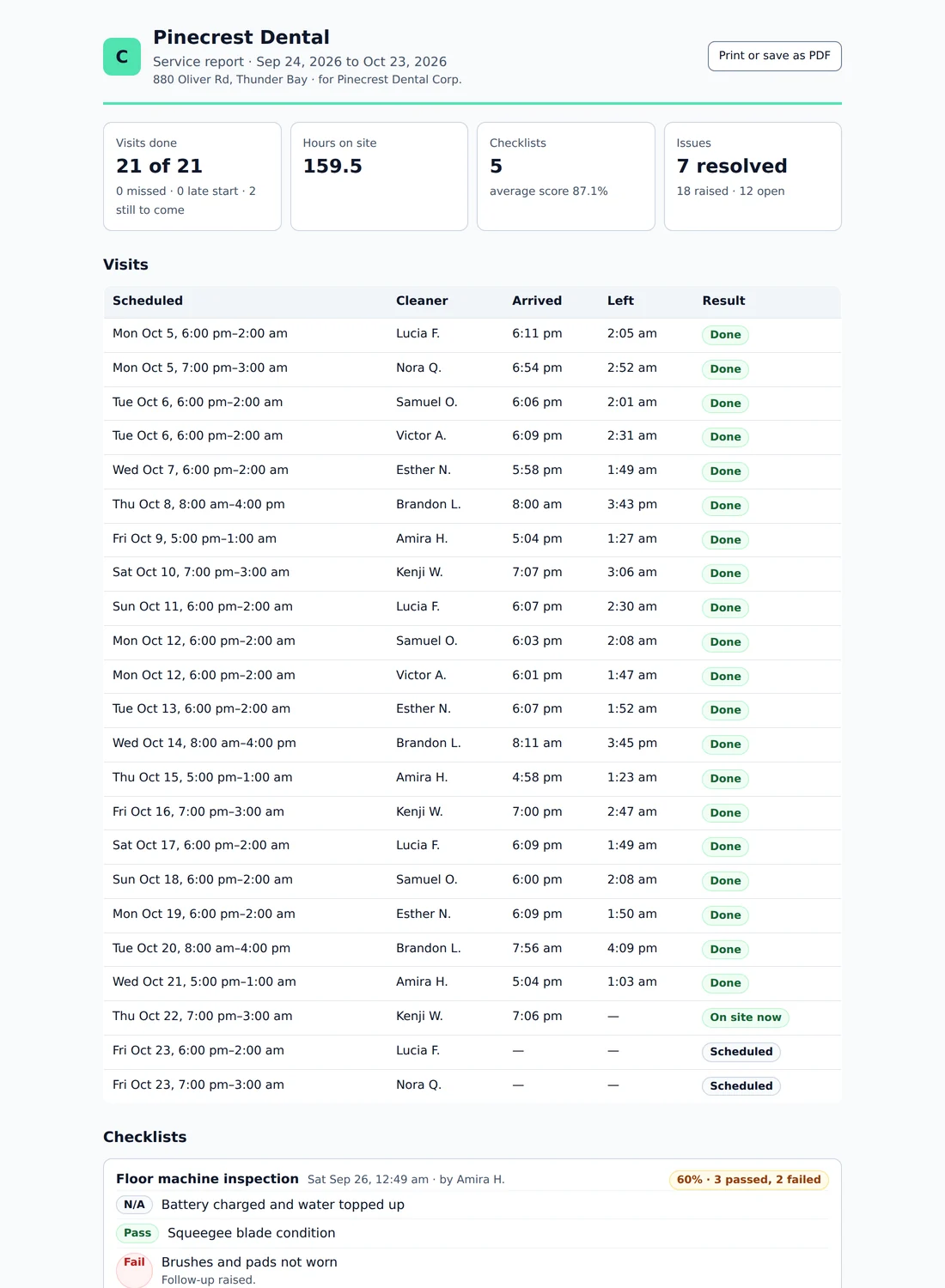
Pick a building and a period. Dispatchen lays out every visit and whether it happened, each checklist with its photos, and what was raised and fixed.
- Print it, save it as a PDF, or send a private link that expires in 30 days
- No pay rates, costs, locations or crew comments, ever
- Names are first name and initial
- You see when the client opened it, and can withdraw the link
Example report with sample data from the demo company.
Getting started
What you'll need
- Your buildings: name, address, the client contact and any crew instructions
- Your cleaners' names and mobile numbers or emails, so we can send each one a link
- Which nights each building is cleaned, and who usually does it
- Your checklist, if you have one. If not, start with ours and change it
Start with one or two buildings for a week or two. When the supervisor can run them without help, add the rest.
Pricing
Priced on what you do, not who you hire.
Every plan carries unlimited users. The tiers differ on what the system does, so hiring a fourth crew member never changes your bill.
Crew
$45
per month · unlimited users
For small crews moving off spreadsheets and group chats.
- Unlimited users, no per-seat fees
- Work orders and job scheduling
- GPS-checked clock-in with photo
- Inspections and checklists for your trade
- Team chat with voice and video calls
- Notifications on phones and computers
- Service reports you can send to clients
- Works on any phone, no app store needed
- Email support
Billed monthly. Cancel any time.
Business
$75
per month · unlimited users
For growing teams with vehicles, equipment and clients to answer to.
- Everything in Crew
- Fleet live map, trips, fuel and service records
- Equipment and inventory tracking
- Suppliers and contracts
- Compliance documents with expiry alerts
- Reports and CSV export
- Priority support
Billed monthly. Cancel any time.
Operations
$149
per month · unlimited users
For established companies that want the books and their clients in one place.
- Everything in Business
- Accounting: money in and out, receipts and tax
- Staff repayments and payroll records
- Client portal: customers see their jobs and progress
- We set it up and import your sites, staff and jobs
- Checklists and templates built for your operation
- A named support contact
Billed monthly. Cancel any time.
- Never per seatPut the whole crew in it. The price is the price at four people or forty.
- No lock-inCancel any time. Take your data with you whenever you want.
- 14 days to change your mindIf it is not a fit, tell us inside two weeks and we refund it.
Questions
What cleaning companies ask
How long does it take to get going?
Most companies start with one or two buildings. Add the buildings, invite the cleaners who work them, set their nights and pick the checklist. That's an evening. Your crew opens a link on their phone; there is no app to install.
Can you move our sites and staff in for us?
On the Operations plan we do the setup and import your sites, staff and schedule from the spreadsheet you already have. You check it before anything goes live.
What happens when there's no signal in the building?
Clocking in needs a connection, because the time is taken from our server, not the phone. Checklists are different: answers and photos are kept on the phone until they're sent, so a basement with no signal doesn't cost anyone their work.
What if a cleaner won't share their location?
Location is only read at clock-in and clock-out, never tracked through the night. If a phone can't share it, the cleaner can still clock in by giving a reason. The card is marked for review and nothing about their pay is decided automatically. You can also turn the location or photo check off.
Do notifications work on iPhones?
Yes, once Dispatchen is added to the Home Screen (iOS 16.4 or later). Apple doesn't deliver web notifications any other way. We show each person how the first time they sign in, and everything also appears in the app's bell.
Does it do payroll?
No. It gives you approved timesheets with breaks, corrections and reasons, exported as a spreadsheet your payroll provider or bookkeeper can use. It doesn't file remittances or pay anyone.
What does the client see?
Only what you send them: a service report for their building, with visits, checklists and photos, and the issues raised and fixed. No pay rates, no costs, no locations, no crew chat, and first names only. Links expire after 30 days and you can withdraw them.
Dispatchen is made by Hexnix Group Inc., 516 High St S, Thunder Bay, Ontario. Data is kept on our server in Montréal, Canada. See our privacy policy and terms.
See it with a cleaning company's nights.
The demo opens as a commercial cleaning company with buildings, night crews, checklists and a client report, so you can run a visit from clock-in to report yourself.